A keylogger built to study how keystroke exfiltration actually
works, so the detection rules I write for it hold up against
something real instead of a textbook example.
Phishing Detector
A tool that scores incoming emails for phishing risk by checking
sender-domain mismatches, link redirects and urgency language,
then flags the ones worth a second look.
Giving student organization officers one place to run everything
OrgFlow replaced the spreadsheet, the scattered Google Forms and the
attendance sheet with a single dashboard. It's used by 15 organizations
covering about 2,000 members.
Student organization officers run real operations with no real tools.
A mid-sized organization tracks a few hundred members, runs weekly events,
takes attendance, and hands all of it to a new officer board every
spring. The stack is a shared spreadsheet, a GroupMe, a Google Form
per event, and somebody's Notes app.
I found this out on the recruiting committee for Alpha Kappa Psi,
where the job turned out to be mostly bookkeeping. Attendance at
chapter meetings, attendance at recruiting events, who was falling
behind on requirements, who we'd actually talked to during rush.
Someone would take attendance on their phone and transcribe it later,
or not. Two officers would edit the same sheet and one version would
win silently.
The cost isn't just annoyance. Attendance data lives across a dozen
separate form responses, so nobody notices a member has gone quiet
until they've already stopped coming. And every May the whole thing
resets, because the context lived in one outgoing officer's head.
Every spring, an organization forgets everything it learned the year before.
Finding out whether it was just us
The gap was strange enough to be worth checking. Thousands of
organizations on thousands of campuses have this problem and the
tooling is a spreadsheet and a group chat, which usually means the
problem is either smaller than it looks or harder than it looks.
I knew officers across a lot of organizations through Alpha Kappa
Psi, so I pitched the idea directly to executive members at
organizations across campus and to people I'd worked with during my
Deloitte internship who ran organizations of their own. Not a
survey. Conversations with the people who'd have to run the thing.
I talked to officers at nine organizations: social fraternities, a
couple of service organizations, two professional fraternities and a
club sports team. Three things changed my direction. Nobody wanted
another place to talk, GroupMe had already won that fight and trying
to replace it would guarantee the tool got ignored. Attendance was
the one task every officer did every week, so it had to be the
fastest path in the product, not a feature buried under a menu. And
the organization structures were messier than I'd assumed going in:
committees, pledge classes and ad-hoc event teams that didn't map
onto any single shape.
The problem generalized. The solution didn't.
The hard part
Every organization agreed on the pain and disagreed on everything
else.
Some run on committees, standing groups with their own meetings and
attendance requirements. Some run on projects, temporary teams that
form around an event and dissolve after. Some have pledge classes with
rules that apply to one cohort and not the rest. Professional
fraternities track requirements service organizations don't have,
and service organizations track hours nobody else cares about.
Building for the organization I knew would produce a tool that only
works for Alpha Kappa Psi. Building each organization what it asked
for would produce three features doing one job, three places for
attendance logic to diverge, and a product that gets harder to
maintain with every organization that adopts it.
The decision: groups
A group is a named subset of members that holds its own events,
attendance and membership, and it doesn't care what the organization
calls it. A committee is a group. A project is a group. A pledge
class is a group. The naming belongs to the organization, the
structure belongs to the product.
That's what let adoption scale past my own chapter without the
product forking into organization-specific versions, and it keeps
attendance logic in one place, which matters when you're solo and
every duplicated path is a future bug.
Structure
Attendance is the spine. Members and events are both views onto the
same grid, so marking attendance is one screen and one pass, and a
member's history is the same data read sideways.
I tried three structures before this one. The first organized
everything around events, which broke the moment an officer wanted to
look up one member's history. The second put members first and buried
attendance two levels down, which meant the most frequent task in the
product took the most clicks to reach. The third treats attendance as
the shared spine both of the first two were missing, which is the
version that shipped.
The product
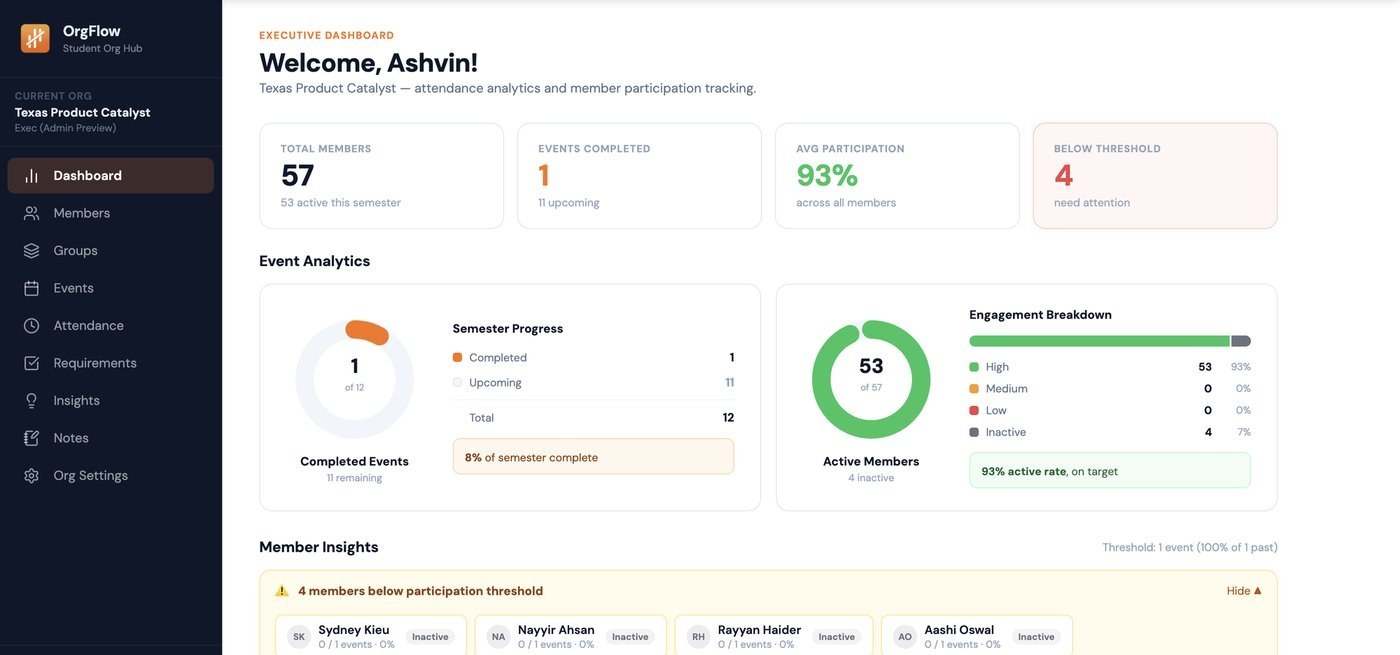
Dashboard, members, events, attendance, groups, insights and notes.
The dashboard answers one question, whether anything needs attention
this week, and everything else is a place to go do the work.
Attendance is a grid, not a form. One tap per member, no submit step.
Officer notes attach to members and survive board turnover.
Insights surfaces members whose attendance is falling before they leave.
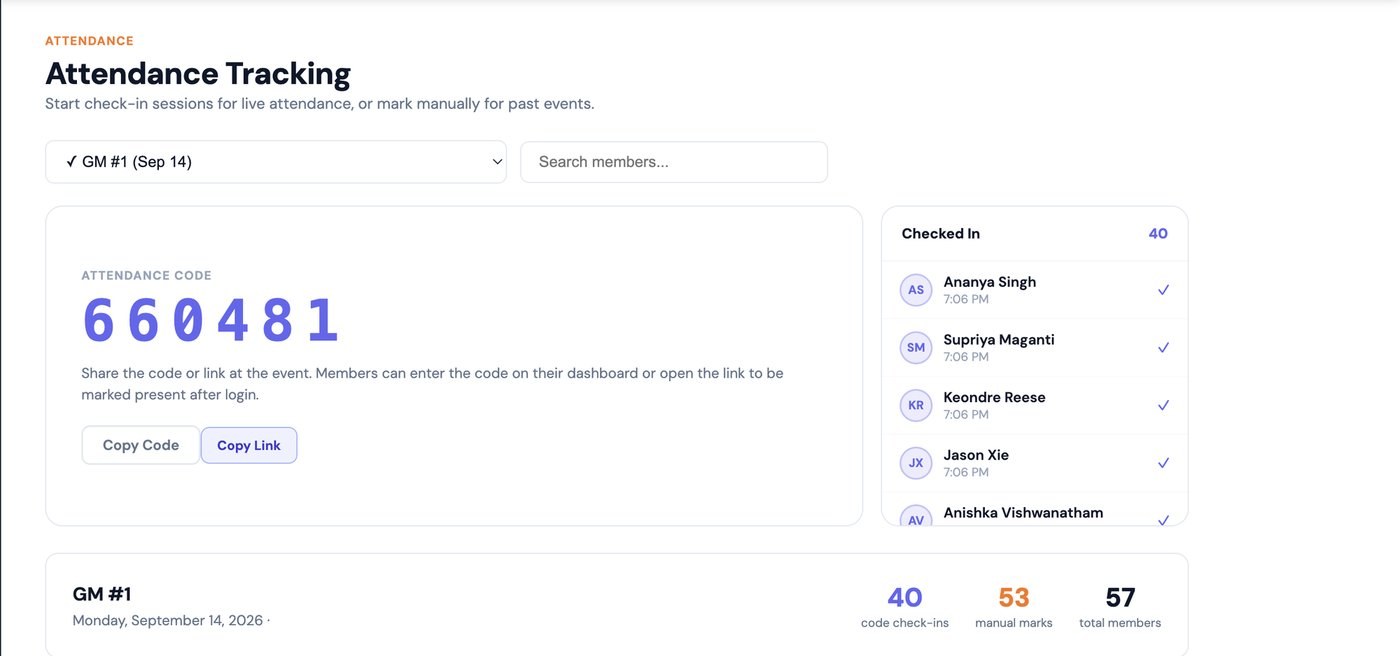
Attendance tracking: a live check-in code for the room, a
running list of who's checked in, and a manual override table for
anyone marked by hand. Still need the empty state and an error state
to round this section out.
What I didn't build
Messaging. Every organization asks for it, and it's the request to
refuse. Organizations already run on GroupMe and Discord, and no
group is moving its social layer into an operations tool. Competing
there would have meant losing
the thing OrgFlow is actually good at in exchange for a fight I'd
lose.
Where it landed
15 organizations are actively logging attendance this semester,
covering roughly 2,000 members. The part I didn't expect is that
officers use notes more than analytics, which says something about
what the job actually is.
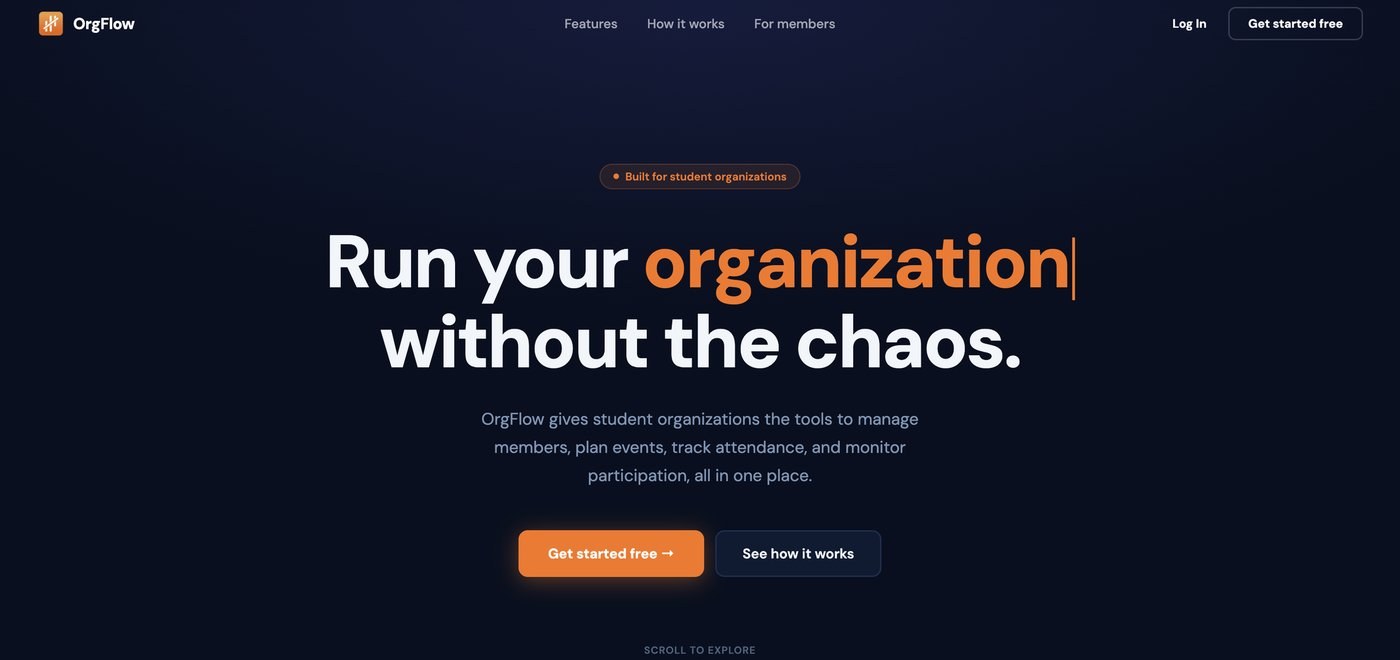
OrgFlow now has its own public site, separate from the
officer dashboard, for orgs discovering it for the first time.
What I'd do differently
I designed the attendance grid for a laptop, and most officers take
attendance standing up at a door, on a phone. That mismatch cost me a
full redesign of the primary flow, and I would have caught it by
watching one meeting before I opened Figma.
The food was never the problem. The two minutes to report it were.
PlateConnect is an iOS app that lets a restaurant manager log surplus in
about the time it takes to wipe down a counter, and gives food banks a
ranked, live feed of what's nearby and how soon it expires.
Role
Cofounder and front-end developer. Design in Figma, built in SwiftUI.
Every donation needs a restaurant to report surplus and a food bank to
come get it, and the two groups are under completely different
pressure.
A closing manager has a few minutes at the end of a long shift and
every additional field is a reason to skip it entirely. Speed is the
only thing that matters, and any request for precision is a request
to not bother.
A food bank coordinator has the opposite need. They're planning
routes, calling shelters, deciding whether a pickup is worth a
driver's hour. Vague is useless to them. "Some sandwiches" doesn't
tell you whether to send a van.
The design problem was never logging speed. It was how little you can ask a manager for while still giving a coordinator enough to act on.
Talking to both sides
We interviewed restaurant managers and food bank coordinators before
committing to a structure.
We talked to seven restaurant managers and five food bank
coordinators. The clearest contradiction: managers wanted to log in
under thirty seconds, while coordinators said they'd rather wait an
extra minute for a real photo and quantity than get five posts a day
they couldn't trust. Neither side would compromise on their half,
which is what confirmed the product needed two very different
experiences built on the same data.
The thing that shaped everything: managers weren't asking for a better form. They wanted the form gone.
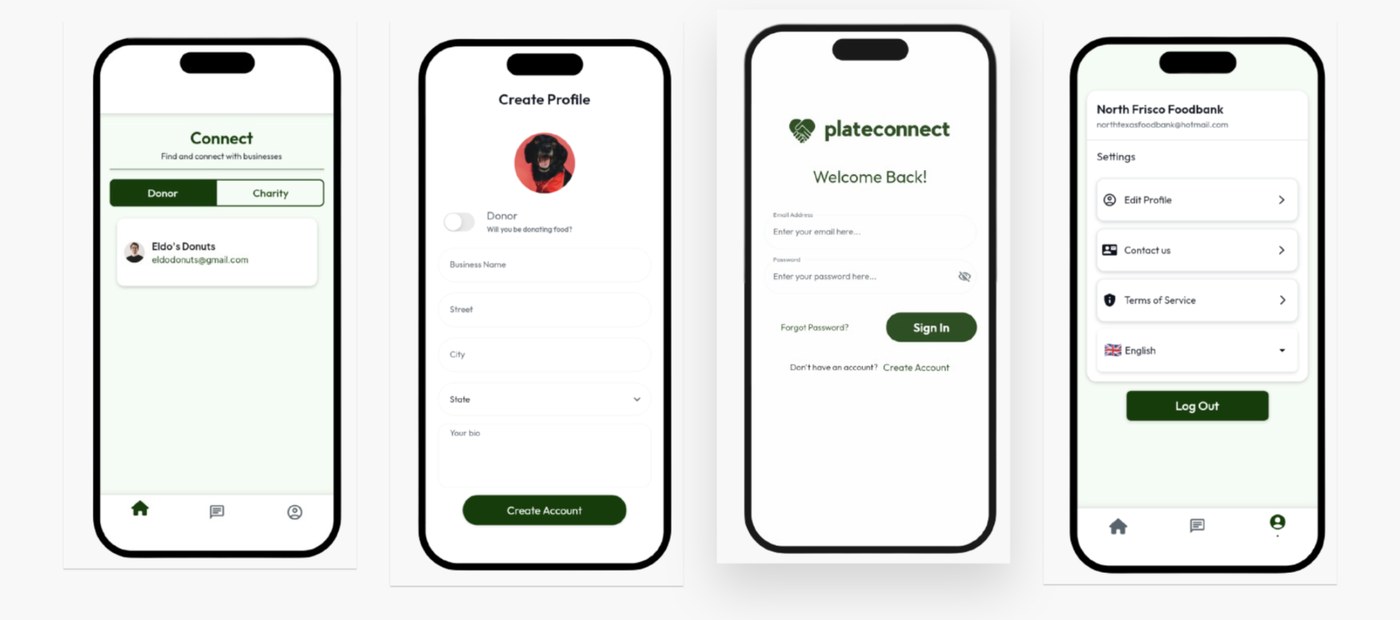
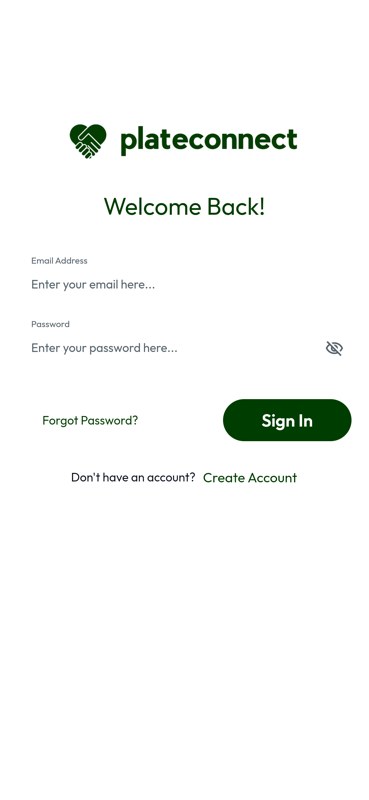
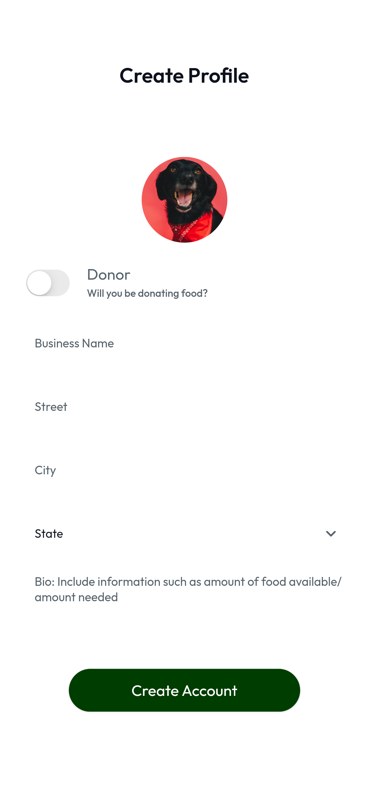
Signing up is intentionally light: pick donor or charity, then a name, address and a short bio, before anything else.
The logging side
The first version we shipped was too simple. It captured almost
nothing beyond the fact that surplus existed, which made logging fast
and made the resulting donations nearly unusable on the other end.
Coordinators couldn't tell what they'd be picking up, so they either
called to ask, which defeated the purpose, or passed.
The fix wasn't adding fields back. It was choosing input types that
carry information without costing time. A photo does the work of a
description, because a coordinator can look at a tray and know what
it is faster than a manager can type it. A slider does the work of a
quantity field, because approximate is genuinely good enough and
nobody was going to weigh anything.
What shipped is one photo and one slider. No typing.
The matching side
A raw feed of donations sorted by post time falls apart as soon as
there's volume. The newest post isn't the most urgent one, and a
coordinator scrolling a list has no way to tell which pickup is about
to become worthless.
So matching ranks by proximity and time remaining rather than
recency. A coordinator opens the app and sees what's closest to
expiring near them, not what happened to be posted most recently.
The ranking score weighs two signals: distance from the coordinator's
usual pickup radius, and hours remaining before the food is unsafe to
serve. Time remaining is weighted more heavily once a donation has
under two hours left, since a slightly farther pickup that's about to
expire beats a closer one that can wait until tomorrow's route.
Everything else sorts by distance alone.
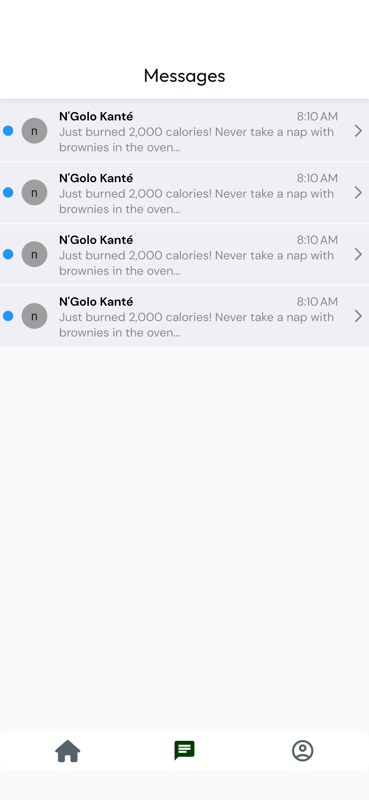
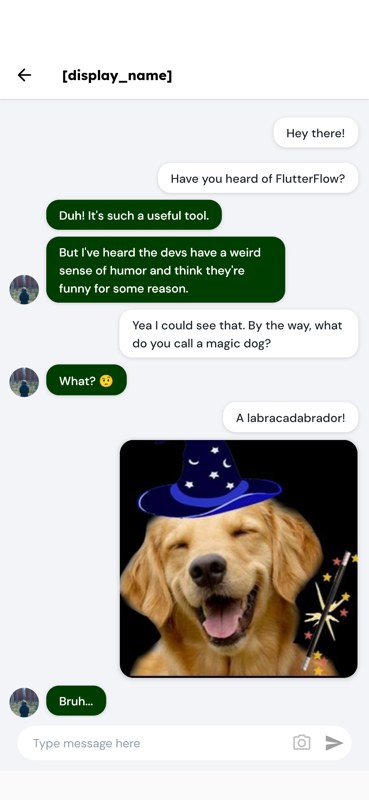
Once a coordinator claims a match, the rest of the logistics (timing,
drop-off details, any last-minute changes) happen over in-app
messaging instead of a phone call, so both sides have a record of
what was agreed to.
Coordination after the match happens in-app.
What I owned
PlateConnect was built by four cofounders. I led front-end and
design: the interface work in Figma, prototyping in FlutterFlow, and
the shipped iOS app in SwiftUI.
Sahil led backend and Firebase architecture, Rithvik owned food bank
partnerships and onboarding, and Sriram ran restaurant outreach and
the App Store submission process.
Where it landed
The app went live on the App Store, with over 100 verified donations
completed across 8 cities and partnerships with more than 20 chains
including Dunkin' and Salad and Go.
20 chains are signed at the corporate level, with active donation
flow concentrated in a smaller set of locations across Austin and
Dallas.
The matching work moved redistribution efficiency by about 25 percent
and adoption by 34 percent. Both numbers come from comparing the four
weeks before the ranked feed shipped to the four weeks after, across
the same set of restaurants and food banks. Redistribution efficiency
is the share of logged surplus picked up before it expires; adoption
is the share of restaurants in a partner chain that logged at least
one donation that week.
Note: the app and its companion website were published to the App
Store and the web, but have since been taken down.
What I'd change
The photo requirement is the one part of the flow I'd revisit. It's
fast, but it's still a camera permission prompt and a few seconds of
framing a shot, and the fastest possible flow is still slower than
just not opening the app. I don't have a clean answer, but I'd want
to test whether a manager could log with zero photo on their first
donation and add it as an optional upgrade once they've built the
habit.
Group travel wasn't a search problem. It was a coordination problem.
SyncTrip is a group-first travel planning concept designed to help
college students coordinate budgets, availability, flight options and
decisions without relying on scattered group chats, screenshots and
spreadsheets.
Role
UX Researcher + Product Designer
Team
4 people
Research
16 survey participants
Type
UI/UX class project
The problem
Planning a trip with friends means negotiating more than a
destination. Existing travel tools are designed around an
individual search, but group travel introduces different budgets,
incompatible schedules and shared decisions, forcing groups to
coordinate across messaging, calendars and screenshots just to
reach one decision.
How might we help groups understand everyone's constraints and reach a travel decision together, without adding more coordination work?
User research
Before designing the interface, I wanted to understand where group
planning actually became uncomfortable. I turned early conversations
into a survey covering travel habits, planning responsibility,
budget, availability and coordination behavior.
16 students and recent graduates responded, spanning different
years, travel experience and budgets. Three quarters had declined a
group trip because of cost, and half of that group had told their
friends they were simply busy instead.
Half of the people who skipped a trip over money told their friends they were just busy.
Personas
Four personas came out of the research, each pointing at a different
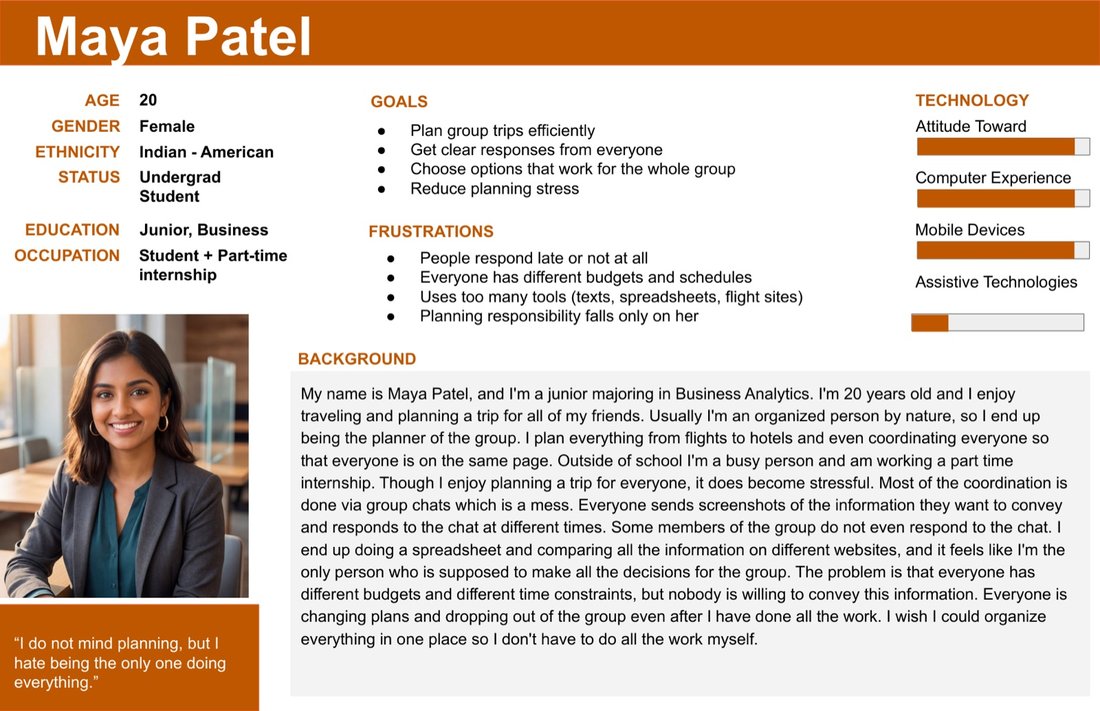
place coordination breaks down. Maya is the overloaded planner,
chasing responses and shared context so the trip doesn't rest
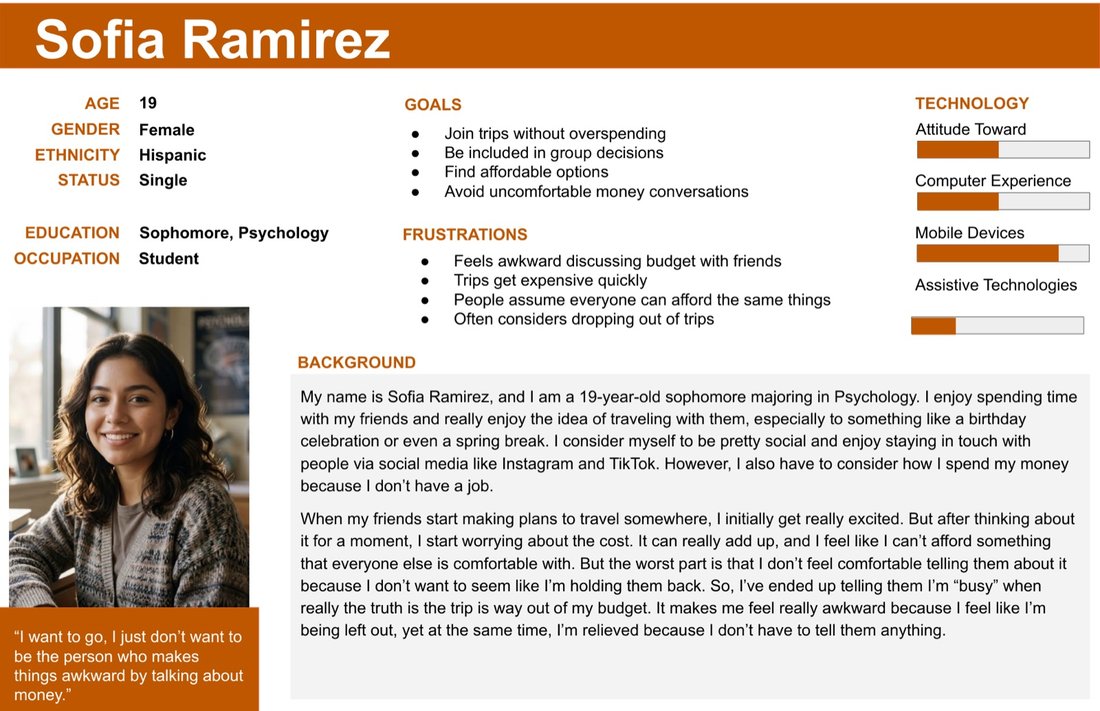
entirely on her. Sofia is budget-conscious and needs affordable
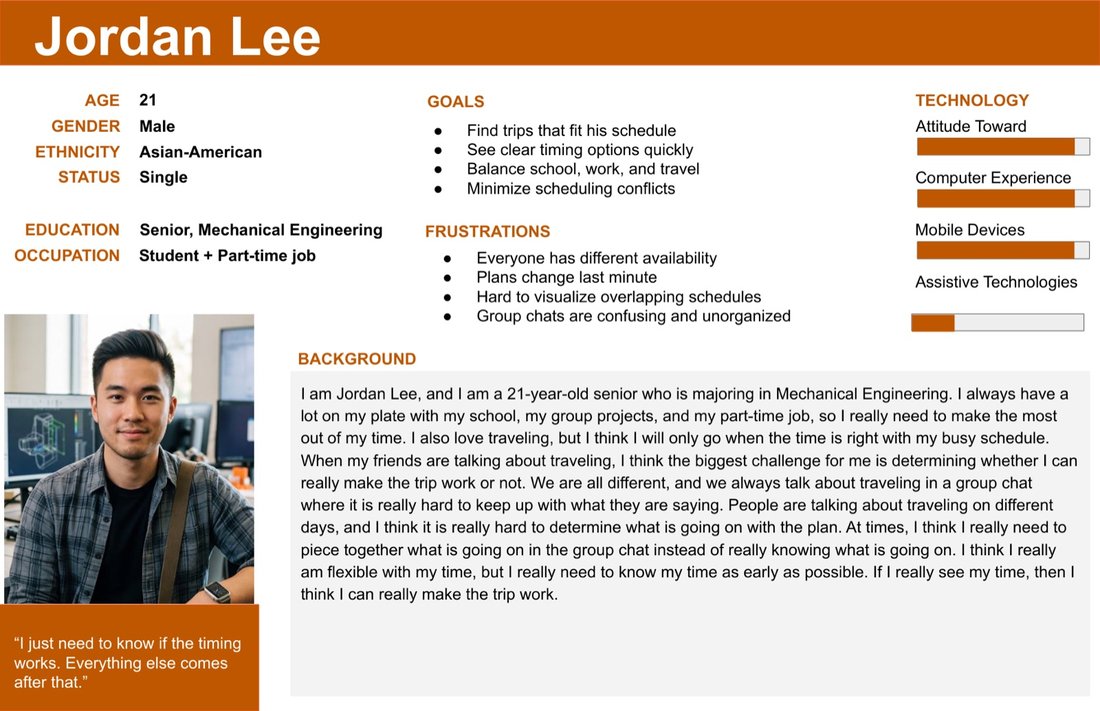
options without an uncomfortable money conversation. Jordan needs
overlapping availability to be visible early, before too much time
gets sunk into a plan that can't work for everyone.
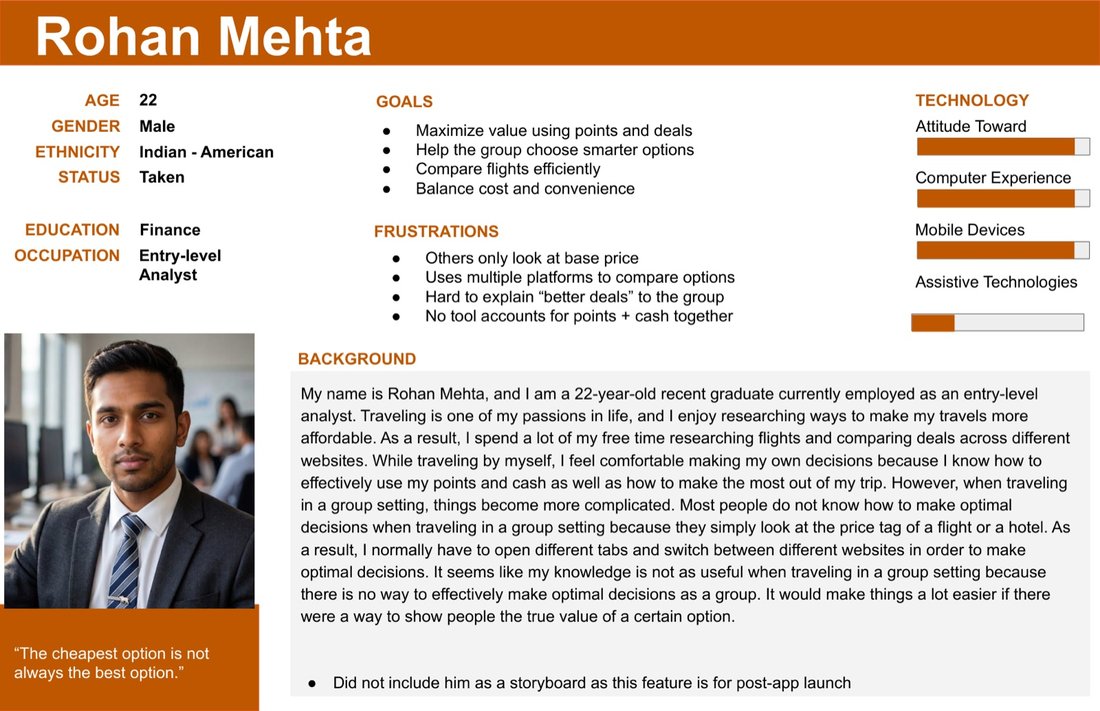
The first three personas shaped the core prototype directly. A
fourth, Rohan, represents a value-optimizing traveler comparing
points, cash and convenience: a real perspective, but a future
product direction rather than something built into this version.
Planner burden
Maya Patel
The overloaded planner
Needs clear responses, shared context, and less planning burden.
Budget comfort
Sofia Ramirez
The budget-conscious traveler
Needs affordable options without an uncomfortable money conversation.
Availability
Jordan Lee
The schedule-constrained traveler
Needs overlapping dates to be visible early and clearly.
Future persona
Rohan Mehta
The value optimizer
Explores points, cash, cost and convenience as a future product direction.
Synthesis
Budget wasn't only a financial constraint. It was a social one.
Three patterns fell out of the research. Budget is personal: people
avoid discussing financial limits even when cost decides whether
they can go. Availability is distributed: classes, work and other
commitments make overlapping dates genuinely hard to find.
Coordination becomes its own project, spread across messages,
calendars, screenshots and travel tools before a group ever agrees.
Transparency: enough shared context for the group to decide.
Comfort: reduce the discomfort around personal financial constraints.
Shared decision-making: move toward consensus without leaning on one overloaded planner.
What Google Flights doesn't solve
Google Flights does flight search well: price comparison, filtering,
flexible dates and clear details are all solid. What it doesn't do
is speak to a group. Multiple people can't compare their own
preferences against each other in the same view, a result never
shows whether it fits everyone, and people end up screenshotting
options just to explain them somewhere else.
What if travel search started with the group's constraints instead of one person's?
From flow to prototype
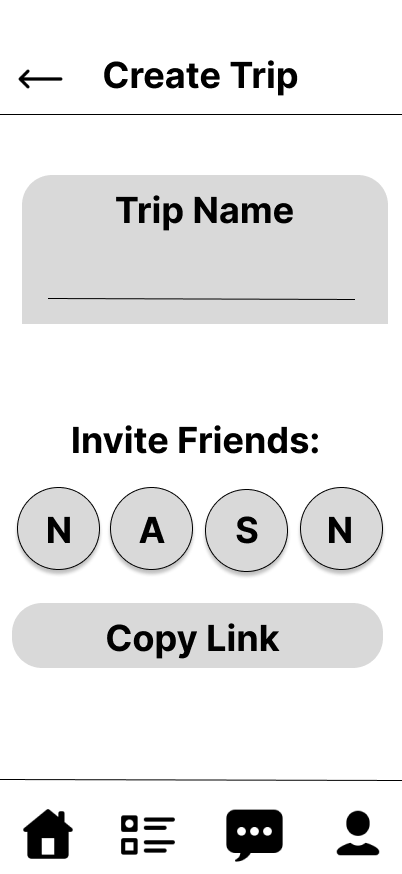
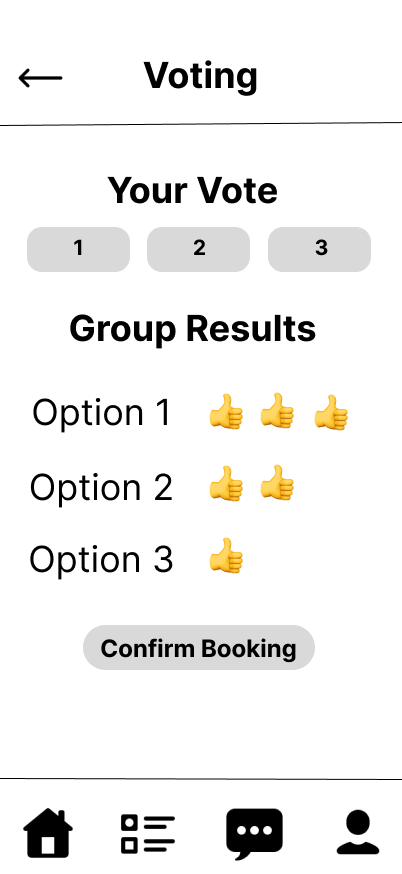
The flow turns individual constraints into one shared decision:
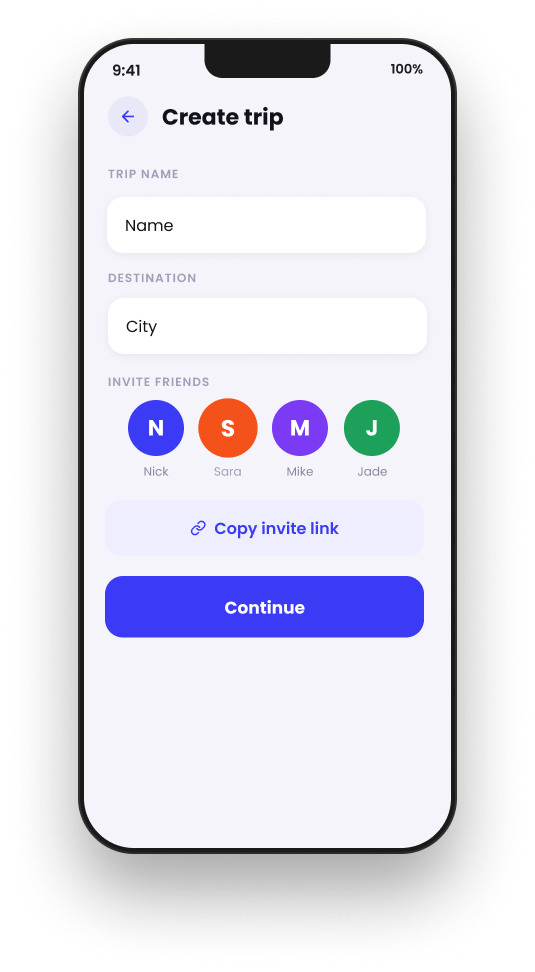
create a trip, invite friends, collect each person's budget and
availability, show the group one overview, compare flight options,
vote, and confirm.
I tested that flow as low-fidelity wireframes before touching visual
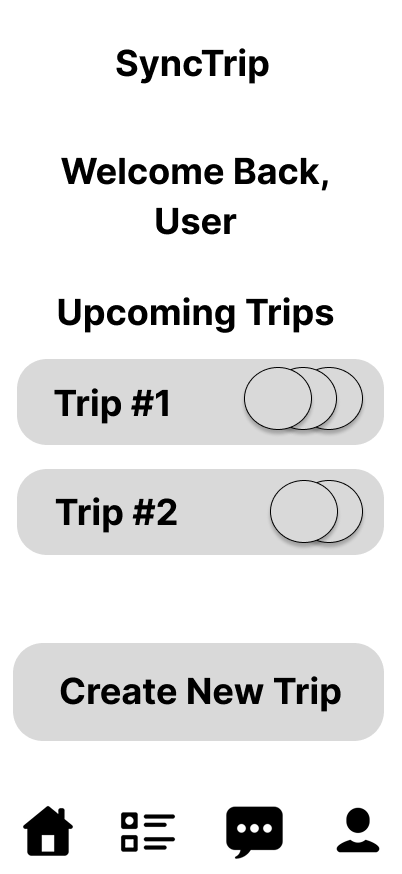
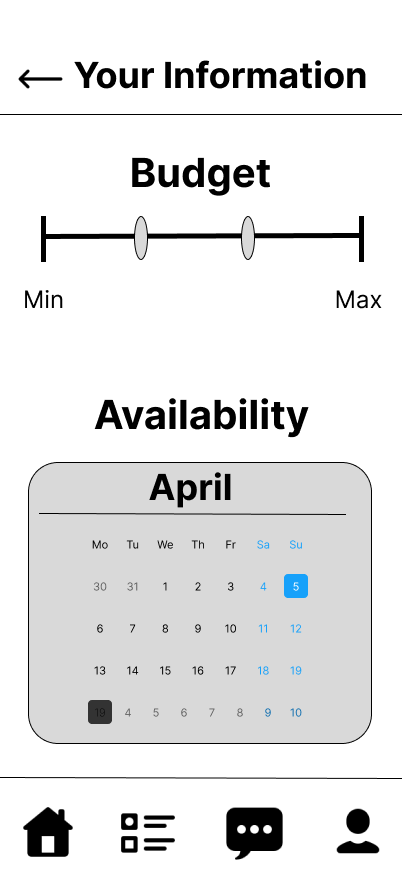
design: home, create and invite, budget and availability, group
overview, flight options, voting and confirmation, to make sure the
connected path held together before polishing anything.
Feedback and iteration
The first prototype surfaced four points of friction: progress
wasn't always clear, trip creation needed more context before asking
for personal constraints, budget sharing felt sensitive, and too
many decisions competed for attention on the same screen.
What changed
→
Clarified trip creation
Added destination earlier so the trip context precedes personal constraints.
→
Simplified each step
Reduced competing actions so each screen asks for one primary decision.
→
Made budget flexible
Used a range and comfort-based interaction instead of one rigid number.
→
Strengthened the decision flow
Connected Group Overview → Flight Options → Voting → Confirmation.
We kept the prototype focused on the coordination problems the
research most directly supported: budget, availability, flight
comparison and group decision-making, rather than expanding into
booking, payments or messaging.
The final experience
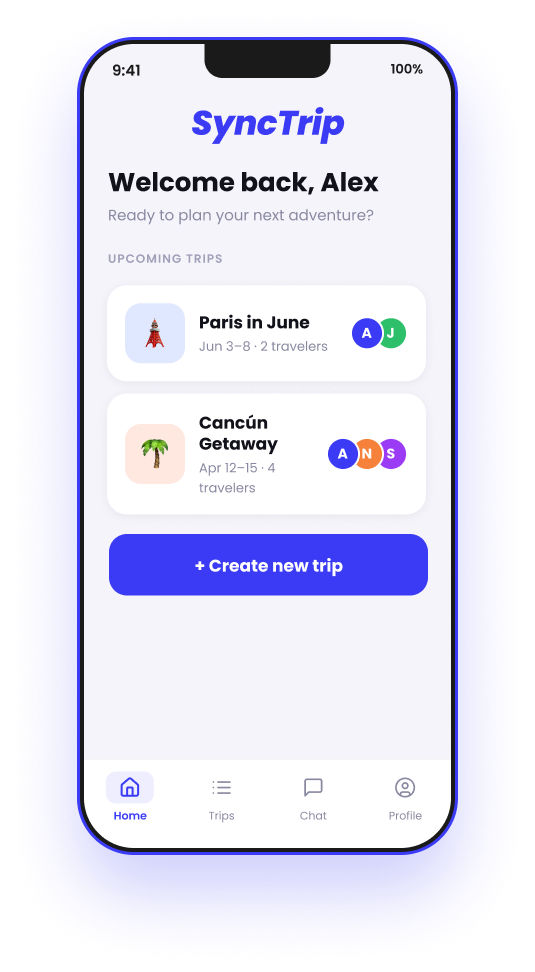
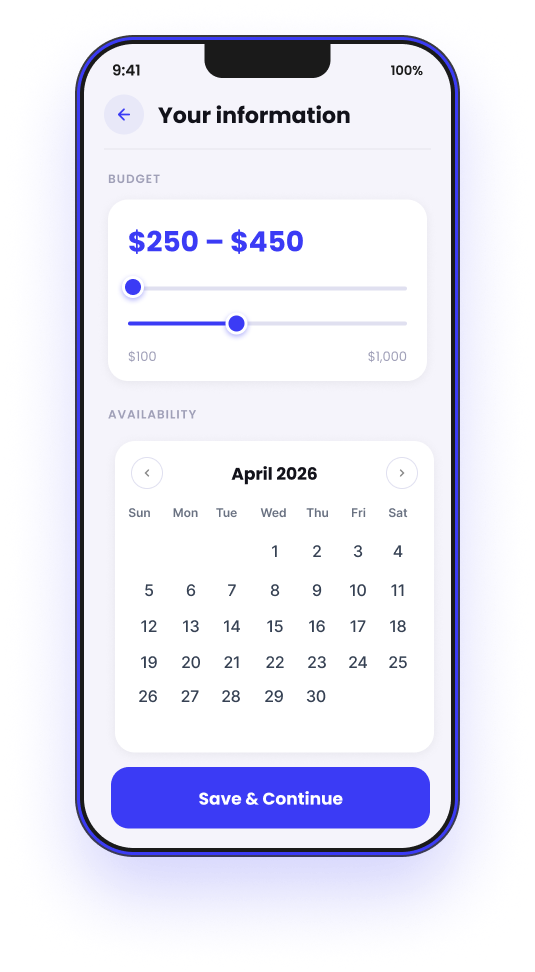
The final flow moves a group from constraints to consensus in three
moments. Each traveler defines their own budget and availability
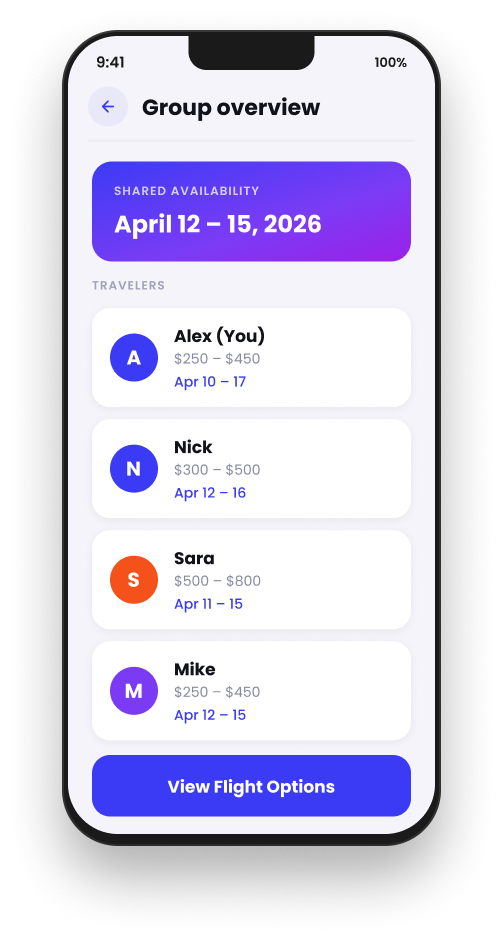
before anyone sees flight options. The group then gets one shared
view: budget ranges, available dates, members and trip context
together, shown at the top of this page. From there, the group
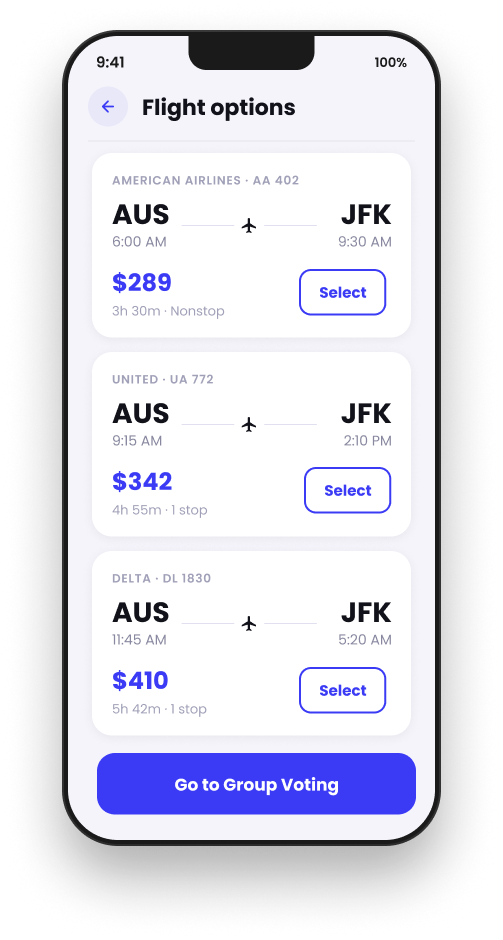
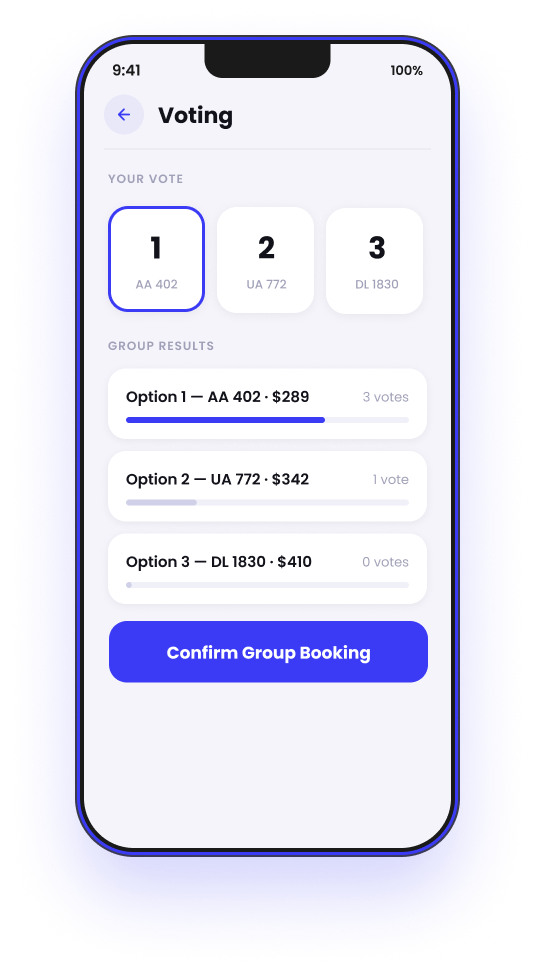
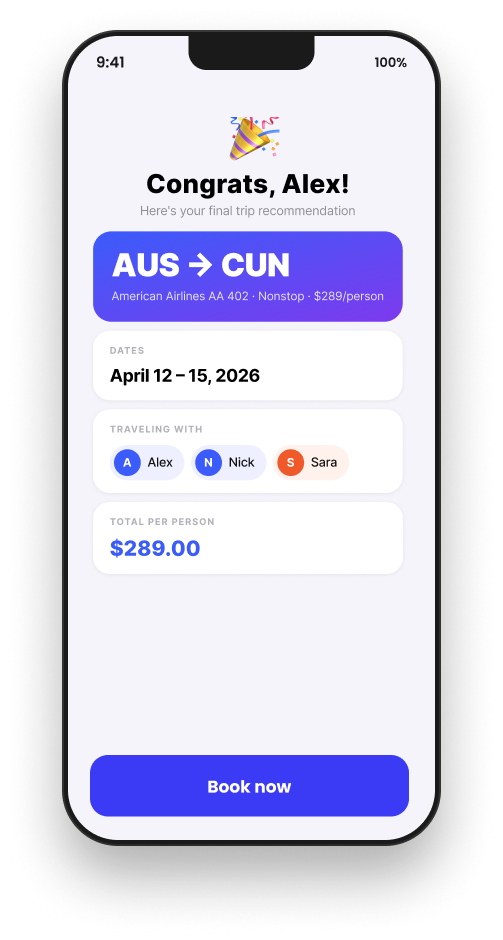
compares flight options, votes and confirms, evaluating every option
against the whole group instead of one traveler's preferences,
shown below.
Compare → Vote → Confirm.
Key UX decisions
Constraints before search: budget and availability are collected before any options appear.
Private input, shared understanding: the group gets enough visibility without forcing unnecessary disclosure.
Group fit over individual fit: options are evaluated by how well they work for everyone, not one traveler.
Voting over chat consensus: a structured mechanism replaces scattered messages.
My role
SyncTrip was a four-person team project for a UI/UX class. I owned
the research and design work end to end: the initial group-travel
research, survey design, synthesizing findings into requirements, a
heuristic analysis of Google Flights, the low-fidelity prototype,
iterating on peer feedback, the high-fidelity prototype, and the
final presentation.
Reflection
The hardest part of group travel happens before anyone books a flight.
I started out thinking about group travel as coordination around
dates and flight options. The research made it clear that some of
the hardest constraints were social, not logistical, and that
shifted the whole design toward helping groups surface constraints,
see where compromise was possible, and actually decide together.
Where I'd take it next
Run moderated usability testing with a group planning a real trip.
Explore more privacy-preserving ways to represent budget constraints.
Test whether voting actually reduces the time and messaging a decision takes.
Validate how people read option rankings against the group's constraints.
Attendees want to wander. Brands want people behind the wheel.
Motor Mania is an event companion app for a Detroit auto expo, designed
as a competition entry, with a flow that moves from browsing the full
vendor floor down to a single car and ends in a test drive request.
Role
Sole designer
Team
Solo, designed and pitched independently
Tools
Figma
Status
Competition proposal, now being redesigned
Two jobs pulling against each other
A car expo has two jobs that pull against each other. Attendees want
to wander and browse, and the brands want qualified people behind
the wheel. I designed Motor Mania as the event's companion app, with
a flow that moves from browsing the full vendor floor down to a
single car and ends in a test drive request.
Ride n' Drive
The feature I pitched hardest was Ride n' Drive. Test drives are the
most valuable thing at an expo and the easiest to overbook, so
instead of first come first served, eligibility is limited to VIP
pass holders with a small number of winners drawn by raffle for
select models.
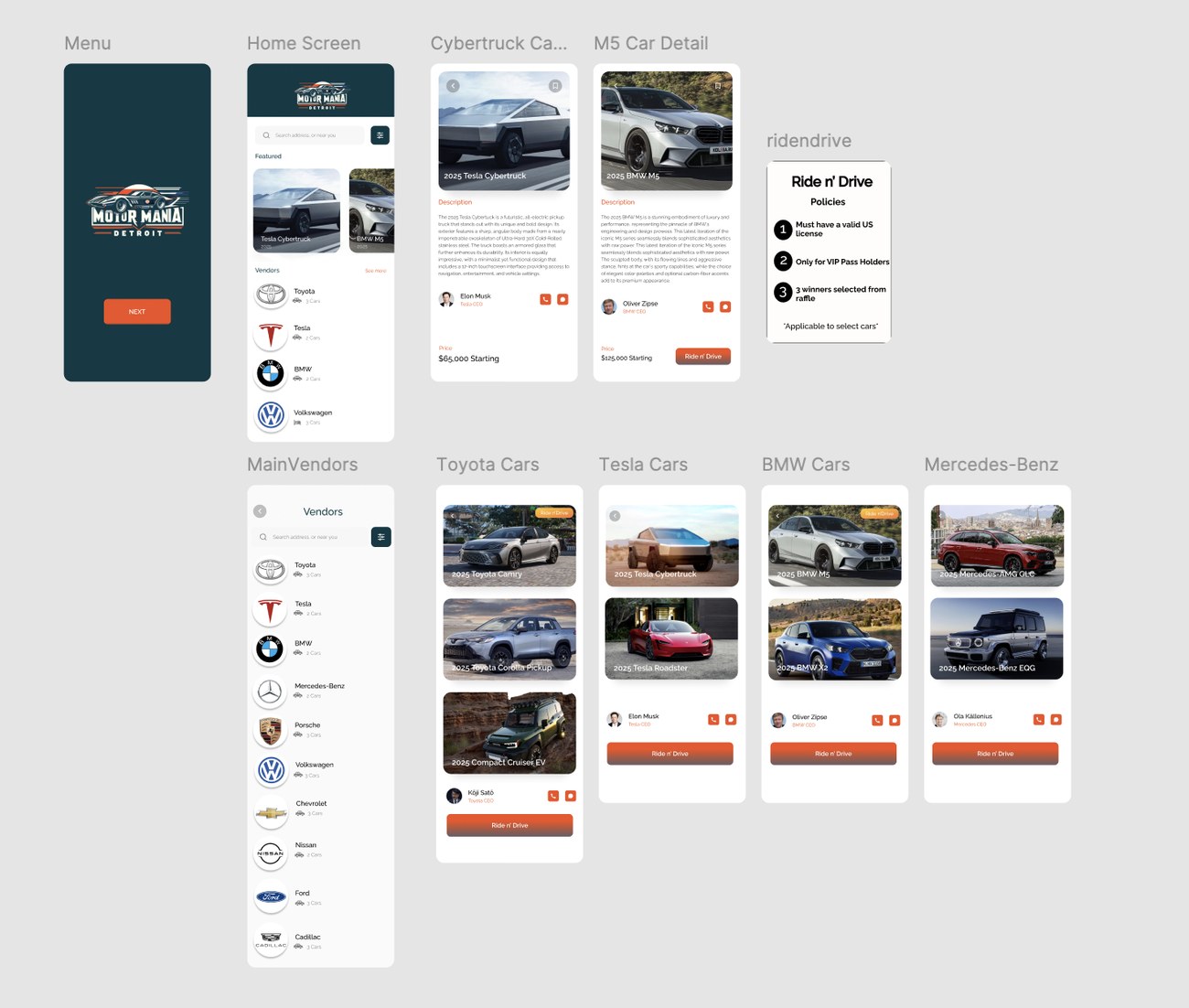
The full flow was designed in Figma as a clickable prototype and
presented as a proposal for the event.
The full clickable prototype: menu, home screen, vendor
list, car detail pages, per-brand car listings, and the Ride n' Drive
policy card.
Revisiting it
Currently redesigning it with a few more years of design practice
behind me. The work in progress restructures the car detail pages
around photos and specs instead of paragraphs, changes who attendees
can reach from a brand page to the reps actually on the floor, and
pulls the Ride n' Drive policies into the same visual system as the
rest of the app.
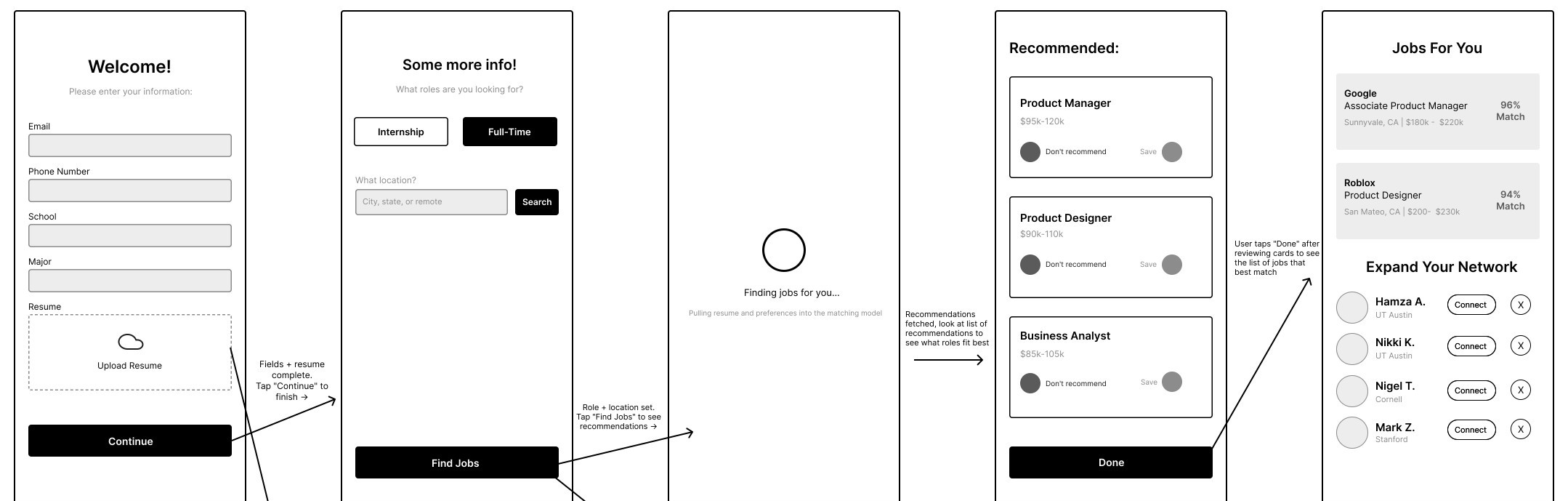
Five screens between opening the app and seeing a job that fits.
A job-seeking app's onboarding flow, built around a single constraint:
five screens, no repeated inputs, from a cold open to a first matched
job. One résumé upload does the work a multi-step intake form usually
does, and a deliberate cut, dropping login entirely, came straight out
of a user interview instead of a guess.
Role
Sole designer
Team
Solo
Tools
Figma
Status
Lo-fi prototype, hi-fi in progress
Five screens, one path
Five screens was a constraint, not a limitation. Every screen in this
flow earns its place by moving the user one step closer to the
moment the app actually delivers: a matched job. Nothing here exists
to introduce the product or build a profile for its own sake. A
résumé upload replaces the long intake form most apps still lead
with, preferences narrow the search to a role type and a location,
a short loading state covers the real time a matching model needs to
run, and the home screen is the exact moment onboarding hands off to
normal use.
That matching pull is the whole point of the five screens before it:
resume and preferences go in, three recommended roles come back to
react to, and the user lands on a ranked home feed with people to
connect with already surfaced, not buried in a settings menu.
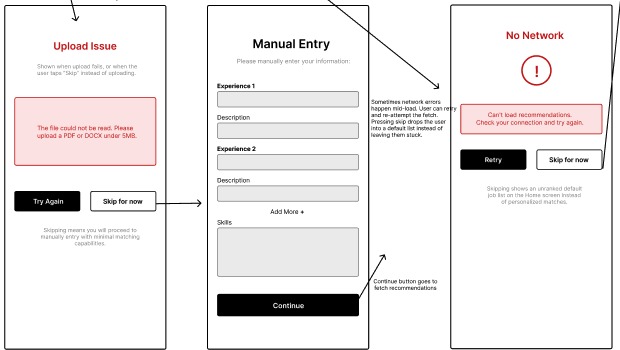
Where it can break
I only designed two failure states, and that was a decision, not
something I ran out of time for. Resume upload and the network call
are the two points where the app's entire value proposition is most
fragile, so those are where I spent the effort. The resume is the
single input the matching model depends on most, so a bad file or a
skip needed a real disclaimer instead of a blank entry. The network
failure sits right before the payoff screen, exactly where a stuck
loading spinner does the most damage to trust: one bad load there
and a user assumes the whole app is broken.
A bad resume upload drops the user into manual entry
instead of a blank form. A failed network call lets them retry or
skip straight to an unranked default list, rather than leaving them
stuck on a spinner.
What I left out, and why
The most important design decision in this flow is a screen that
isn't there. I left out account authentication entirely. The flow
assumes the user is already logged in, which keeps onboarding
focused on the one thing this app is actually for: matching someone
to a job. That wasn't a shortcut, it came directly out of a user
interview I ran before building the prototype.
Repetitive authentication steps are what drive people away from apps during onboarding.
That single line changed the shape of the prototype more than
anything else in it. Cutting a screen most job apps treat as
mandatory was intentional, not an oversight, and it's the reason
this flow gets someone from a cold open to a matched job in five
screens instead of seven.
The other two omissions are smaller, and deliberately so. I didn't
design a permission-denied state for location, since location here
is a typed search rather than a device permission request, so that
failure mode doesn't apply. Field validation, like catching a
malformed email or an empty required field, is left out for the same
reason: it's a refinement on top of this core sequence, not a
decision that changes its shape.
Where it stands
This is lo-fi on purpose. The flow, the failure states and the
omissions above are the actual argument this prototype is making,
and none of that needed color or type to prove out. Visual design
comes next, once the shape underneath it has already held up.
BeyondCorp: How Google Stopped Trusting the Network
Ashvin Jayanthi·Independent case study·October 15, 2026
Overview
BeyondCorp is Google's answer to a simple question: why should a laptop be trusted just because it is plugged into the company network? After a serious breach of its corporate systems, Google rebuilt how employees reach internal tools so that access depends on who you are and the condition of your device, not on where you connect from. This case study covers what triggered the change, how the system works, how Google migrated without breaking everyone's workday, how the idea became the industry's zero trust movement, and where it still falls short.
This is an independent write-up built from public sources, listed at the end. It is not affiliated with or endorsed by Google, and every claim about what Google did comes from Google's own published material or from the outside sources named.
The castle and moat problem
For decades, most companies protected their internal systems the way a medieval castle protects its people: thick walls, one guarded gate, and the assumption that anyone inside is friendly. Google's own engineers described the traditional perimeter model with exactly that comparison in the first BeyondCorp paper. The weakness is obvious once you say it out loud. If an attacker gets past the gate, or a compromised laptop gets carried inside, they inherit easy access to everything behind it.
Google's later retrospective lists why the model was breaking down by around 2011. Employees were working from homes, coffee shops and airplanes, and the VPN they needed to get back inside added friction, especially on phones and tablets. Contractors and partners needed access to a few internal tools, not the whole network. Cloud and SaaS apps meant some corporate services no longer lived inside the walls at all. And vulnerable or already compromised devices were regularly being brought inside the perimeter. The company also wanted the ability to respond to an attack quickly and automatically, which a flat trusted network does not make easy (Google Security Blog, 2019).
The trigger: Operation Aurora
On January 12, 2010, Google publicly said it had detected a highly sophisticated, targeted attack on its corporate infrastructure in mid-December, originating from China, that resulted in stolen intellectual property. It also said at least twenty other large companies across the internet, finance, technology, media and chemical sectors had been similarly targeted. Google said a primary goal appeared to be accessing the Gmail accounts of Chinese human rights activists, but that only two accounts seemed to have been accessed, and only limited account details such as subject lines, not message content. It added that it was already using what it learned to improve its infrastructure and architecture (Official Google Blog, Jan 2010). The campaign later became known as Operation Aurora.
Years later, Google described Aurora as the moment it realized that it, along with much of the industry, had been doing cybersecurity wrong, and says it launched BeyondCorp in response (Google, blog.google). Google's BeyondCorp site tells the same origin story (beyondcorp.com).
Two caveats are worth being honest about. First, Google's own accounts disagree slightly on when the project started: a 2017 Google Cloud post says 2010, while the 2019 retrospective says it became clear by 2011 that the old model was a problem. Second, the 2014 paper I read in full does not mention Aurora at all. The link between the breach and the redesign comes from Google's later retelling, which is credible, but it is Google's account of its own motives.
The idea: trust the device and the person, not the network
Google summarizes BeyondCorp in three principles. Where you connect from does not decide what you can reach. Access depends on what the infrastructure knows about you and your device. And every request, not just the first one, must be authenticated, authorized and encrypted (Google Security Blog, 2019).
The 2014 paper explains how that works in practice, and the parts fit together like this (Ward and Beyer, 2014). Only managed devices, ones the company buys and tracks, can reach corporate apps. Each device is recorded in an inventory database and gets a certificate tied to that record. The certificate does not grant access by itself. It works more like a key to what the company has recorded about that device over its life. Users live in a separate database tied to HR processes, and sign in through a single sign-on system that checks a second factor and issues short-lived tokens.
Every internal app is then exposed through one internet-facing access proxy, so there is no special trusted network to get onto. A trust inference step scores devices and users using signals like whether the operating system is patched, and an access control engine uses those scores, plus group membership, to approve or deny each request. Different apps can demand different levels. The paper's example is a bug tracker limited to full-time engineers on engineering devices, with viewing a bug held to a lower bar than searching or editing.
The paper also walks through one request end to end, using an internal code review tool. The engineer's laptop presents its device certificate to the proxy, which does not yet know the user and sends them to single sign-on. After the engineer proves who they are with a password and second factor, the proxy has both a device identity and a user token. The access control engine then checks, on every request, that the user is in the right group with enough trust, and that the device is managed, in good standing, and sufficiently trusted. If any check fails, the request is denied.
Every request is checked against both the user and the device
A request only reaches the app if both the user and the device pass. A failure at any check stops it at the proxy.
The hard part: migrating without breaking anyone's workday
The architecture is the easy part to admire. The harder problem was moving a whole company off a trusted network without stopping work, and the 2014 paper is candid that moving everyone at once would have been too risky for business continuity (Ward and Beyer, 2014). Google took a phased approach built on data.
First, every application was qualified to work through the access proxy, moving through three stages: reachable only inside the network or over VPN, then reachable both ways, then reachable only through the proxy. Second, Google analyzed job functions to decide which groups of employees, such as finance, sales, legal or engineering, could move first based on what tools they actually used. Third, it discouraged VPN use step by step, limiting it to people with a proven need and removing access from people who stopped using it.
The most interesting piece was how Google decided who was ready. It built a traffic analysis pipeline from sampled network flow data across every switch, and compared that traffic against the access rules the new unprivileged network would enforce, to find what would have broken. It also ran a monitor on employee devices that first only logged traffic that would have been blocked. Users and devices became candidates for enforcement after 30 contiguous days with more than 99.9 percent of traffic eligible. They moved to enforcement mode above 99.99 percent. Another 30 days of clean operation in enforcement was the signal to actually move them. People whose workflows were not yet supported could register a temporary exemption and get notified when it was fixed.
Google's 2019 retrospective adds the lessons it would hand to anyone copying the approach. Get executive support early and keep re-confirming it. Treat the quality of device and user data as a first-class problem, because bad data means wrong access decisions. Aim for a migration employees barely notice, start small, and expect to grant exceptions at first. Put employee and helpdesk advocates on the team, communicate changes clearly before enforcing them, and run the access infrastructure with site reliability engineering discipline, since every request now passes through it. Google also says that getting the basics in place took several years (Google Security Blog, 2019).
What changed afterward: zero trust goes mainstream
BeyondCorp did not appear in a vacuum. In 2010, the same year as Google's disclosure, Forrester analyst John Kindervag published a report called No More Chewy Centers, which introduced the term zero trust and attacked the hard-shell, soft-center model of network security (Illumio). Kindervag supplied the name and the framing, and Google supplied a large, working implementation, published over four public papers between 2014 and 2017. Google now describes BeyondCorp as its implementation of the zero trust model (Google Cloud, archived page).
The idea then moved from conference talks into policy. In August 2020, NIST published Special Publication 800-207, Zero Trust Architecture. It defines the approach as granting no implicit trust to a device or account based on network location or ownership alone, with authentication and authorization happening before a session to a resource begins, and it focuses on protecting resources rather than network segments (NIST SP 800-207). A 2021 executive order, 14028, then directed the US federal government toward zero trust architecture (Defense Acquisition University). By late 2021, Google was also offering a version of the model to other companies as BeyondCorp Enterprise, according to the archived Google Cloud page above.
So a design that started as one company's internal fix for one bad breach became the reference model for how governments and enterprises talk about access control.
Where the idea falls short
The strongest criticism of zero trust is not that the idea is wrong. It is that it is far easier to describe than to deploy. A 2025 CSO Online piece, fifteen years after the term appeared, reports that organizations still struggle because of fragmented tooling and legacy infrastructure, and quotes one CISO arguing that overly complex, overly strict approaches drive up cost and time, while a simpler risk-based path that starts with achievable use cases works better (CSO via GuidePoint, Dec 2025).
Legacy systems come up in nearly every critique. An ISACA piece points out that older applications often cannot support standards like single sign-on, so they sit outside any zero trust design and become the gap in the strategy (ISACA, 2023). A VentureBeat article cites a survey of 300 federal IT and program managers in which 58 percent named rebuilding or replacing legacy infrastructure as their biggest obstacle, and it also warns about vendor marketing that stretches the term, noting that many organizations claiming full implementation admit they have not covered every area (VentureBeat). Kindervag himself has said zero trust is a strategy, not a product, which is a polite way of saying that buying a tool labeled zero trust does not give you one (Bank Info Security).
Google's own papers contain the same warnings. In 2014 it expected a long tail of workflows that would take time to move, singling out older desktop applications that speak proprietary protocols to servers (Ward and Beyer, 2014). In 2019 it stressed data quality and the need for highly reliable infrastructure, since every request depends on it (Google Security Blog, 2019).
There is also a question the sources do not answer directly, so this part is my own reading. Google could make device trust work partly because it already controlled its devices, ran a device inventory, and could require its apps to sit behind a proxy. A company that lacks any of those starts further back than Google did.
My take: it worked because it was a product decision
The thing that stands out to me is that BeyondCorp is framed as a security architecture but was run like a product launch. Google's stated mission was to let every employee work from untrusted networks without a client-side VPN, and the 2014 paper says the experience of working locally and remotely is effectively identical apart from latency. The VPN was both the weak point and the annoying part of the old setup, so removing it made security and convenience point in the same direction. Security programs usually fail when they ask people to accept more friction for abstract safety. This one offered something people actually wanted.
The migration details back that up. Google built tooling to predict who would be hurt before moving them, ran changes in logging mode before enforcing them, created an exemption path, assigned helpdesk advocates, and communicated ahead of enforcement. Those are the habits of a team that treats employees as users with jobs to do, not as a compliance population.
I would also be careful with the phrase zero trust. It describes a direction, not a finished state, and the access decisions are only as good as the device and user data feeding them. Google said as much in 2019. If I were advising a smaller company, I would not start with the proxy. I would start with an accurate device inventory and a short list of high-value apps, because that data is the foundation every later decision sits on. That is my judgment, not something the sources prescribe.
What I would measure if I owned this
If I were the product owner for a BeyondCorp-style rollout, I would track five things, because they cover adoption, user experience, security and reliability together. Only the first row comes straight from a Google source. The rest are my own proposals, and the sources I read give no figures for them.
Area
Metric
What it tells me
Basis
Readiness
Share of each user's traffic that would pass the new access rules
Whether moving them will break their work
Google's 2014 migration thresholds
Adoption
Share of internal apps behind the access proxy, and VPN users still active
How much of the old perimeter is left
My proposal
Experience
Helpdesk tickets and exception requests per migrated user, and time to close them
Whether security is costing productivity
My proposal
Security
Share of access decisions that used fresh device data, and time to cut off a device that falls out of compliance
Whether trust decisions are actually informed
My proposal
Reliability
Availability and latency of the proxy and access engine
Are VIP Models Targeting the Bettors Most at Risk?
Ashvin Jayanthi and 2 others·ML research project·In Progress Fall 2026
Overview
Sportsbooks use machine learning to decide which customers get VIP treatment: hosts, bonuses and promotions. This project asks whether a model built to find the bettors who will lose the most money ends up targeting the bettors who are most at risk of gambling problems. DraftKings' data isn't public, so we build a substitute VIP model on real betting records from the online sportsbook bwin, build a separate risk model, and measure how much the two overlap. Then we test a simple fix: drop the bettors the risk model flags from the VIP list and measure how much revenue that costs.
This is an in-progress research project. The page describes the question, data and method. Results will be added once the models are trained and evaluated.
Why it matters
In September 2026, reporting described how DraftKings built a machine-learning model in 2023 to find customers likely to gamble, and lose, more after promotions, while sidelining a model that would have flagged at-risk users (Boston.com, 2026). DraftKings denies targeting customers based on losses or signs of problem gambling.
The stakes are concentrated. In Connecticut, problem gamblers make up 1.8% of residents but generate 51% of sports betting revenue (Connecticut DMHAS, 2024). If a VIP model rewards whoever loses the most, it may be steering promotions straight at the people least able to handle them. Our goal is a simple, repeatable check that regulators, companies or researchers could run on any VIP model.
The gap in earlier work
Past studies such as Philander (2014) built models to identify high-risk online gamblers. Two things were missing. They tested on the same bettors they were built on, which overstates accuracy, and they never compared their risk models with the kind of model a company uses to pick VIPs. This project addresses both.
The plan
Build a model that predicts which bettors will lose the most money. Its top picks stand in for a sportsbook's VIP list.
Build a model that predicts which bettors are at risk of gambling problems.
Count how many of the VIP picks are at risk.
Test a fix: leave out bettors the risk model flags and measure how much revenue that costs.
The data
We use a free public dataset of real betting records from bwin, shared by Harvard's Division on Addiction through the Transparency Project. It covers 2,068 bettors whom bwin flagged for possible gambling problems between November 2008 and November 2009, and 2,066 controls who made their first deposit on the same day but were not flagged in that period. We link to the data rather than republish it.
Table
What it holds
How we use it
Demographics
User ID, case or control group, country, language, gender, birth year, registration and first deposit dates
The at-risk label, and sign-up dates for the time-based split
Daily aggregates
Per user, day and product: amount staked, amount lost and number of bets, in euros, for 4,113 bettors
Betting features and the future losses the VIP model predicts. 21 controls with no bets are dropped
Responsible gambling details
For the 2,068 flagged bettors: number of RG events, first and last RG dates, first event type and intervention type
The first flag date, so features only use betting from before it
Method
Features. From each bettor's first month, we compute how often they bet, how much they stake, how much they lose, and whether their bets grow over time.
Loss model, the stand-in VIP model. Linear regression and a random forest predict each bettor's future losses. The top 10% of predicted losers become the VIP picks.
Risk model. Logistic regression, a random forest and a simple neural network predict who gets flagged.
The audit. Count how many VIP picks are at risk, then remove the ones the risk model flags and measure the revenue lost.
Avoiding leakage. We train on bettors who signed up earlier and test on those who signed up later, so results reflect how the models would do on new customers. Each flagged bettor and their same-day control stay in the same split, and features only use betting from before the first flag.
How we'll judge it
Piece
Metrics
Compared against
Risk model
Recall, precision and F1 on later sign-ups. Recall matters most, since missing an at-risk bettor is the costly mistake
The approach from earlier studies, and a simple rule such as flagging anyone whose bets per day pass a cutoff
Loss model
RMSE on later sign-ups
Predicting the average loss for everyone, and linear regression versus random forest
The fix
Share of the top 10% VIP picks who are at risk, before and after removing flagged bettors, and the share of revenue kept
Works if the at-risk share drops a lot while most revenue stays
Limits
Substitute data. DraftKings' data isn't public, so we use bwin records from 2005 to 2010, not today's US market.
Label limits. A flag means bwin took a responsible gambling action, not that a problem was confirmed. Unflagged bettors may also have developed problems after November 2009.
Milestones and deliverables
Data access and exploratory analysis
Betting features and the earlier versus later sign-up split
Train and compare the loss and risk models
Count how many VIP picks are at risk
Remove flagged bettors from the VIP picks and measure revenue lost
Final report and presentation
The code will be Python notebooks using pandas, scikit-learn and Keras, in a public GitHub repo with a README that explains how to rerun everything from the raw files.